1)When BW executes an infopackage for data extraction the BW system sends a Request IDoc ( RSRQST ) to the ALE inbox of the source system.Information bundled in Request IDoc (RSRQST) is :
Request Id ( REQUEST )
Request Date ( REQDATE )
Request Time (REQTIME)
Info-source (ISOURCE)
Update mode (UPDMODE )
2)The source system acknowledges the receipt of this IDoc by sending an Info IDoc (RSINFO) back to BW system.The status is 0 if it is ok or 5 for a failure.
3)Once the source system receives the request IDoc successfully, it processes it according to the information in the request. This request starts the extraction process in the source system (typically a batch job with a naming convention that begins with BI_REQ).
The request IDoc status now becomes 53 (application document posted). This status means the system cannot process the IDoc further
4)The source system confirms the start of the extraction job by the source system to BW by sending another info IDoc (RSINFO) with status = 1
5)Transactional Remote Function Calls (tRFCs) extract and transfer the data to BW in data packages. Another info IDoc (RSINFO) with status = 2 sends information to BW about the data package number and number of records transferred
6)At the conclusion of the data extraction process (i.e., when all the data records are extracted and transferred to BW), an info IDoc (RSINFO) with status = 9 is sent to BW, which confirms the extraction process.

18 Feb 2009
Appearence of Values for charecterstic input help screen
Which settings can I make for the input help and where can I maintain these settings?
In general, the following settings are relevant and can be made for the input help for characteristics:
Display: Determines the display of the characteristic values with the following options "Key", "Text", "Key and text" and "Text and key".
Text type: If there are different text types (short, medium and long text), this determines which text type is to be used to display the text.
Attributes: You can determine for the input help which attributes of the characteristic are displayed initially. When you have a large number of attributes for the characteristic, it makes sense to display only a selected number of attributes. You can also determine the display sequence of the attributes.
F4 read mode: Determines in which mode the input help obtains its characteristic values. This includes the modes "Values from the master data table (M)", "Values from the InfoProvider (D)" and "Values from the Query Navigation (Q)".
Note that you can set a read mode, on the one hand, for the input help for query execution (for example, in the BEx Analyzer or in the BEX Web) and, on the other hand, for the input help for the query definition (in the BEx Query Designer).
You can make these settings in InfoObject maintenance using transaction RSD1 in the context of the characteristic itself, in the InfoProvider-specific characteristic settings using transaction RSDCUBE in the context of the characteristic within an InfoProvider or in the BEx Query Designer in the context of the characteristic within a query. Note that not all the settings can be maintained in all the contexts. The following table shows where certain settings can be made:
Setting RSD1 RSDCUBE BExQueryDesigner
Display X X X
Text type X X X
Attributes X - -
Read mode
- Query execution X X X
- Query definition X - -
Note that the respective input helps in the BEx Web as well as in the BEx Tools enable you to make these settings again after executing the input help.
When do I use the settings from InfoObject maintenance (transaction RSD1) for the characteristic for the input help?
The settings that are made in InfoObject maintenance are active in the context of the characteristic and may be overwritten at higher levels if required. At present, the InfoProvider-specific settings and the BEx Query Designer belong to the higher levels. If the characteristic settings are not explicitly overwritten in the higher levels, the characteristic settings from InfoObject maintenance are active.
When do I use the settings from the InfoProvider-specific characteristic settings (transaction RSDCUBE) for the input help?
You can make InfoProvider-specific characteristic settings in transaction RSDCUBE -> context menu for a characteristic -> InfoProvider-specific properties.
These settings for the characteristic are active in the context of the characteristic within an InfoProvider and may be overwritten in higher levels if required. At present, only the BEx Query Designer belongs to the higher levels. If the characteristic settings are not explicitly overwritten in the higher levels and settings are made in the InfoProvider-specific settings, these are then active. Note that the settings are thus overwritten in InfoObject maintenance.
When do I use the settings in the BEx Query Designer for characteristics for the input help?
In the BEx Query Designer, you can make the input help-relevant settings when you go to the tab pages "Display" and "Advanced" in the "Properties" area for the characteristic if this is selected.
These settings for the characteristic are active in the context of the characteristic within a query and cannot be overwritten in higher levels at present. If the settings are not made explicitly, the settings that are made in the lower levels take effect.
How can I display attributes for the characteristic in the input help?
Attributes for the characteristic can be displayed in the respective filter dialogs in the BEx Java Web or in the BEx Tools using the settings dialogs for the characteristic. Refer to the related application documentation for more details.
In addition, you can determine the initial visibility and the display sequence of the attributes in InfoObject maintenance on the tab page "Attributes" -> "Detail" -> column "Sequence F4". Attributes marked with "0" are not displayed initially in the input help.
Why do the settings for the input help from the BEx Query Designer and from the InfoProvider-specific characteristic settings not take effect on the variable screen?
On the variable screen, you use input helps for selecting characteristic values for variables that are based on characteristics. Since variables from different queries and from potentially different InfoProviders can be merged on the variable screen, you cannot clearly determine which settings should be used from the different queries or InfoProviders. For this reason, you can use only the settings on the variable screen that were made in InfoObject maintenance.
Why do the read mode settings for the characteristic and the provider-specific read mode settings not take effect during the execution of a query in the BEx Analyzer?
The query read mode settings always take effect in the BEx Analyzer during the execution of a query. If no setting was made in the BEx Query Designer, then default read mode Q (query) is used.
How can I change settings for the input help on the variable screen in the BEx Java Web?
In the BEx Java Web, at present, you can make settings for the input help only using InfoObject maintenance. You can no longer change these settings subsequently on the variable screen.
In general, the following settings are relevant and can be made for the input help for characteristics:
Display: Determines the display of the characteristic values with the following options "Key", "Text", "Key and text" and "Text and key".
Text type: If there are different text types (short, medium and long text), this determines which text type is to be used to display the text.
Attributes: You can determine for the input help which attributes of the characteristic are displayed initially. When you have a large number of attributes for the characteristic, it makes sense to display only a selected number of attributes. You can also determine the display sequence of the attributes.
F4 read mode: Determines in which mode the input help obtains its characteristic values. This includes the modes "Values from the master data table (M)", "Values from the InfoProvider (D)" and "Values from the Query Navigation (Q)".
Note that you can set a read mode, on the one hand, for the input help for query execution (for example, in the BEx Analyzer or in the BEX Web) and, on the other hand, for the input help for the query definition (in the BEx Query Designer).
You can make these settings in InfoObject maintenance using transaction RSD1 in the context of the characteristic itself, in the InfoProvider-specific characteristic settings using transaction RSDCUBE in the context of the characteristic within an InfoProvider or in the BEx Query Designer in the context of the characteristic within a query. Note that not all the settings can be maintained in all the contexts. The following table shows where certain settings can be made:
Setting RSD1 RSDCUBE BExQueryDesigner
Display X X X
Text type X X X
Attributes X - -
Read mode
- Query execution X X X
- Query definition X - -
Note that the respective input helps in the BEx Web as well as in the BEx Tools enable you to make these settings again after executing the input help.
When do I use the settings from InfoObject maintenance (transaction RSD1) for the characteristic for the input help?
The settings that are made in InfoObject maintenance are active in the context of the characteristic and may be overwritten at higher levels if required. At present, the InfoProvider-specific settings and the BEx Query Designer belong to the higher levels. If the characteristic settings are not explicitly overwritten in the higher levels, the characteristic settings from InfoObject maintenance are active.
When do I use the settings from the InfoProvider-specific characteristic settings (transaction RSDCUBE) for the input help?
You can make InfoProvider-specific characteristic settings in transaction RSDCUBE -> context menu for a characteristic -> InfoProvider-specific properties.
These settings for the characteristic are active in the context of the characteristic within an InfoProvider and may be overwritten in higher levels if required. At present, only the BEx Query Designer belongs to the higher levels. If the characteristic settings are not explicitly overwritten in the higher levels and settings are made in the InfoProvider-specific settings, these are then active. Note that the settings are thus overwritten in InfoObject maintenance.
When do I use the settings in the BEx Query Designer for characteristics for the input help?
In the BEx Query Designer, you can make the input help-relevant settings when you go to the tab pages "Display" and "Advanced" in the "Properties" area for the characteristic if this is selected.
These settings for the characteristic are active in the context of the characteristic within a query and cannot be overwritten in higher levels at present. If the settings are not made explicitly, the settings that are made in the lower levels take effect.
How can I display attributes for the characteristic in the input help?
Attributes for the characteristic can be displayed in the respective filter dialogs in the BEx Java Web or in the BEx Tools using the settings dialogs for the characteristic. Refer to the related application documentation for more details.
In addition, you can determine the initial visibility and the display sequence of the attributes in InfoObject maintenance on the tab page "Attributes" -> "Detail" -> column "Sequence F4". Attributes marked with "0" are not displayed initially in the input help.
Why do the settings for the input help from the BEx Query Designer and from the InfoProvider-specific characteristic settings not take effect on the variable screen?
On the variable screen, you use input helps for selecting characteristic values for variables that are based on characteristics. Since variables from different queries and from potentially different InfoProviders can be merged on the variable screen, you cannot clearly determine which settings should be used from the different queries or InfoProviders. For this reason, you can use only the settings on the variable screen that were made in InfoObject maintenance.
Why do the read mode settings for the characteristic and the provider-specific read mode settings not take effect during the execution of a query in the BEx Analyzer?
The query read mode settings always take effect in the BEx Analyzer during the execution of a query. If no setting was made in the BEx Query Designer, then default read mode Q (query) is used.
How can I change settings for the input help on the variable screen in the BEx Java Web?
In the BEx Java Web, at present, you can make settings for the input help only using InfoObject maintenance. You can no longer change these settings subsequently on the variable screen.
15 Jan 2009
ABAP program to find prev request in cube and delete
There will be cases when we cannot use the SAP built-in settings to delete previous request..The logic to determine previous request may be so customised, a requirement.
In such cases you can write a ABAP program which calculates previous request basing our own defined logic.
Following are the tables used :
RSICCONT ---(list of all requests in any particular cube)
RSSELDONE ----- ( has got Reqnumb, source , target , selection infoobject , selections ..etc)
Following is one example code. Logic is to select request based on selection conditions used in the infopackage:
REPORT ZGET_LAST_REQ_SHORT_RUN.
PARAMETERS : TAR_CUBE(9) TYPE C,
SOUR_ODS(9) TYPE C.
DATA : IT_REQ LIKE TABLE OF RSICCONT.
data : it_REQ_WA type RSICCONT.
DATA : IT_CALMONTH_LOW TYPE /BI0/OICALMONTH.
DATA : IT_CALMONTH_HIGH TYPE /BI0/OICALMONTH.
data : diff type N.
DATA : IT_REQ_CUBE LIKE TABLE OF RSSELDONE.
data : it_REQ_CUBE_WA type RSSELDONE.
data : sour_tar(22) type C.
TABLES : ZBW_PARAM.
CLEAR It_REQ.
CLEAR it_REQ_WA.
CLEAR it_REQ_CUBE.
CLEAR DIFF.
concatenate SOUR_ODS '_TO_' TAR_CUBE INTO SOUR_TAR.
SELECT * FROM RSICCONT INTO TABLE IT_REQ WHERE ICUBE = TAR_CUBE.
LOOP AT IT_REQ INTO IT_REQ_WA.
SELECT * FROM RSSELDONE INTO TABLE IT_REQ_CUBE WHERE RNR = IT_REQ_WA-RNR AND SOURCE = SOUR_ODS AND FIELDNAME = 'CALMONTH'.
ENDLOOP.
LOOP AT IT_req_cube into it_req_cube_wa.
IT_CALMONTH_LOW = IT_REQ_CUBE_wa-LOW.
IT_CALMONTH_HIGH = IT_REQ_CUBE_wa-HIGH.
diff = IT_CALMONTH_HIGH - IT_CALMONTH_LOW.
if diff <= 3.
ZBW_PARAM-ZKEY1 = 'INV_SHORT_REQ'.
ZBW_PARAM-ZKEY2 = SOUR_TAR.
ZBW_PARAM-ZDATA = IT_REQ_CUBE_WA-RNR.
MODIFY ZBW_PARAM.
ENDIF.
endloop.
Once after reqnumb is found out, you can pass
cubename, reqnumb as inputs to FM : RSSM_DELETE_REQUEST and get the job done.
In such cases you can write a ABAP program which calculates previous request basing our own defined logic.
Following are the tables used :
RSICCONT ---(list of all requests in any particular cube)
RSSELDONE ----- ( has got Reqnumb, source , target , selection infoobject , selections ..etc)
Following is one example code. Logic is to select request based on selection conditions used in the infopackage:
REPORT ZGET_LAST_REQ_SHORT_RUN.
PARAMETERS : TAR_CUBE(9) TYPE C,
SOUR_ODS(9) TYPE C.
DATA : IT_REQ LIKE TABLE OF RSICCONT.
data : it_REQ_WA type RSICCONT.
DATA : IT_CALMONTH_LOW TYPE /BI0/OICALMONTH.
DATA : IT_CALMONTH_HIGH TYPE /BI0/OICALMONTH.
data : diff type N.
DATA : IT_REQ_CUBE LIKE TABLE OF RSSELDONE.
data : it_REQ_CUBE_WA type RSSELDONE.
data : sour_tar(22) type C.
TABLES : ZBW_PARAM.
CLEAR It_REQ.
CLEAR it_REQ_WA.
CLEAR it_REQ_CUBE.
CLEAR DIFF.
concatenate SOUR_ODS '_TO_' TAR_CUBE INTO SOUR_TAR.
SELECT * FROM RSICCONT INTO TABLE IT_REQ WHERE ICUBE = TAR_CUBE.
LOOP AT IT_REQ INTO IT_REQ_WA.
SELECT * FROM RSSELDONE INTO TABLE IT_REQ_CUBE WHERE RNR = IT_REQ_WA-RNR AND SOURCE = SOUR_ODS AND FIELDNAME = 'CALMONTH'.
ENDLOOP.
LOOP AT IT_req_cube into it_req_cube_wa.
IT_CALMONTH_LOW = IT_REQ_CUBE_wa-LOW.
IT_CALMONTH_HIGH = IT_REQ_CUBE_wa-HIGH.
diff = IT_CALMONTH_HIGH - IT_CALMONTH_LOW.
if diff <= 3.
ZBW_PARAM-ZKEY1 = 'INV_SHORT_REQ'.
ZBW_PARAM-ZKEY2 = SOUR_TAR.
ZBW_PARAM-ZDATA = IT_REQ_CUBE_WA-RNR.
MODIFY ZBW_PARAM.
ENDIF.
endloop.
Once after reqnumb is found out, you can pass
cubename, reqnumb as inputs to FM : RSSM_DELETE_REQUEST and get the job done.
23 Dec 2008
Decision making process type in Process chains
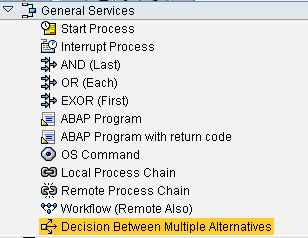
To Logically decide on the next step in the process chain flow( IF-THEN-ELSE), we can use option of "Decision between multiple Alternatives" Process type.
Step 1 : Choose "Decision between multiple Alternatives " Process type.Drag it to process chain window.
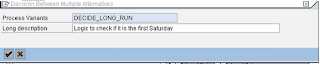
Step 2: We get a popu-up.Create a new decision making variant.

Step 3: Define the formula for IF. We have got formula editor for help.
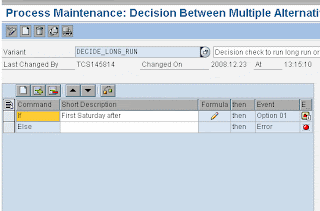
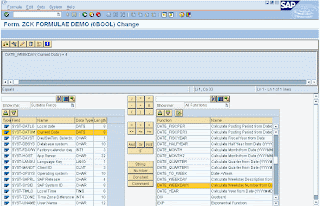
We can define as many formula's as we have we options for next step.
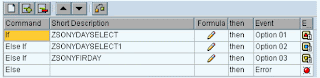
Step 4: Each of the above IF condition is marked against a event ( options ) and they can be used in the process chain to define the next step ( to the respective option )
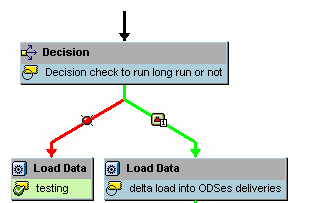
Step 1 : Choose "Decision between multiple Alternatives " Process type.Drag it to process chain window.

Step 2: We get a popu-up.Create a new decision making variant.


Step 3: Define the formula for IF. We have got formula editor for help.


We can define as many formula's as we have we options for next step.

Step 4: Each of the above IF condition is marked against a event ( options ) and they can be used in the process chain to define the next step ( to the respective option )

5 Nov 2008
DTP filer Routine
Following is the example of routine written in DTP filter.
While writing the logic of l_t_range-SIGN,l_t_range-OPTION,l_t_range-LOW etc. we should write l_t_range-Fieldname also here...
data: l_idx like sy-tabix.
read table l_t_range with key
fieldname = 'PLANT'.
l_idx = sy-tabix.
DATA : IT_PLANT LIKE TABLE OF /BI0/PPLANT.
data : it_plant_wa type /BI0/PPLANT.
DATA : IT_COUNTRY LIKE TABLE OF /BI0/PCOUNTRY.
CLEAR IT_COUNTRY.
CLEAR IT_PLANT.
SELECT * FROM /BI0/PCOUNTRY INTO TABLE IT_COUNTRY WHERE /BIC/ZMARKET2
= 'USA'.
IF IT_COUNTRY[] IS NOT INITIAL.
SELECT * FROM /BI0/PPLANT
INTO TABLE IT_PLANT
FOR ALL ENTRIES IN
IT_COUNTRY
WHERE COUNTRY = IT_COUNTRY-COUNTRY.
ENDIF.
LOOP AT IT_PLANT INTO IT_PLANT_WA.
l_t_range-low = IT_PLANT_WA-PLANT.
l_t_range-Fieldname = 'PLANT'.
l_t_range-SIGN = 'I'.
l_t_range-OPTION = 'EQ'.
append l_t_range.
ENDLOOP.
if l_idx <> 0.
modify l_t_range index l_idx.
else.
append l_t_range.
endif.
p_subrc = 0.
While writing the logic of l_t_range-SIGN,l_t_range-OPTION,l_t_range-LOW etc. we should write l_t_range-Fieldname also here...
data: l_idx like sy-tabix.
read table l_t_range with key
fieldname = 'PLANT'.
l_idx = sy-tabix.
DATA : IT_PLANT LIKE TABLE OF /BI0/PPLANT.
data : it_plant_wa type /BI0/PPLANT.
DATA : IT_COUNTRY LIKE TABLE OF /BI0/PCOUNTRY.
CLEAR IT_COUNTRY.
CLEAR IT_PLANT.
SELECT * FROM /BI0/PCOUNTRY INTO TABLE IT_COUNTRY WHERE /BIC/ZMARKET2
= 'USA'.
IF IT_COUNTRY[] IS NOT INITIAL.
SELECT * FROM /BI0/PPLANT
INTO TABLE IT_PLANT
FOR ALL ENTRIES IN
IT_COUNTRY
WHERE COUNTRY = IT_COUNTRY-COUNTRY.
ENDIF.
LOOP AT IT_PLANT INTO IT_PLANT_WA.
l_t_range-low = IT_PLANT_WA-PLANT.
l_t_range-Fieldname = 'PLANT'.
l_t_range-SIGN = 'I'.
l_t_range-OPTION = 'EQ'.
append l_t_range.
ENDLOOP.
if l_idx <> 0.
modify l_t_range index l_idx.
else.
append l_t_range.
endif.
p_subrc = 0.
13 Oct 2008
Function module to make yellow request to RED
Use SE37, to execute the function module RSBM_GUI_CHANGE_USTATE.From the next screen, for I_REQUID enter that request ID and execute.From the next screen, select 'Status Erroneous' radiobutton and continue.This Function Module, change the status of request from Green / Yellow to RED.
7 Oct 2008
ABAP routine in infopackage for Multiple Selections
Requirement : 0plant should be restricted in the infopackage level using routine picking only selective plants ( say under some country or region )
Following is the code, i tried and working fine.
Solution
data: l_idx like sy-tabix.
DATA : IT_PLANT LIKE TABLE OF /BI0/PPLANT.
data : it_plant_wa type /BI0/PPLANT.
read table l_t_range with key
fieldname = 'PLANT'.
l_idx = sy-tabix.
SELECT * FROM /BI0/PPLANT INTO TABLE IT_PLANT WHERE COUNTRY = 'BE'.
LOOP AT IT_PLANT INTO IT_PLANT_WA.
l_t_range-low = IT_PLANT_WA-PLANT.
l_t_range-SIGN = 'I'.
l_t_range-OPTION = 'EQ'.
append l_t_range.
ENDLOOP.
modify l_t_range index l_idx.
p_subrc = 0.
Following is the code, i tried and working fine.
Solution
data: l_idx like sy-tabix.
DATA : IT_PLANT LIKE TABLE OF /BI0/PPLANT.
data : it_plant_wa type /BI0/PPLANT.
read table l_t_range with key
fieldname = 'PLANT'.
l_idx = sy-tabix.
SELECT * FROM /BI0/PPLANT INTO TABLE IT_PLANT WHERE COUNTRY = 'BE'.
LOOP AT IT_PLANT INTO IT_PLANT_WA.
l_t_range-low = IT_PLANT_WA-PLANT.
l_t_range-SIGN = 'I'.
l_t_range-OPTION = 'EQ'.
append l_t_range.
ENDLOOP.
modify l_t_range index l_idx.
p_subrc = 0.
Subscribe to:
Posts (Atom)