There will be cases when we cannot use the SAP built-in settings to delete previous request..The logic to determine previous request may be so customised, a requirement.
In such cases you can write a ABAP program which calculates previous request basing our own defined logic.
Following are the tables used :
RSICCONT ---(list of all requests in any particular cube)
RSSELDONE ----- ( has got Reqnumb, source , target , selection infoobject , selections ..etc)
Following is one example code. Logic is to select request based on selection conditions used in the infopackage:
REPORT ZGET_LAST_REQ_SHORT_RUN.
PARAMETERS : TAR_CUBE(9) TYPE C,
SOUR_ODS(9) TYPE C.
DATA : IT_REQ LIKE TABLE OF RSICCONT.
data : it_REQ_WA type RSICCONT.
DATA : IT_CALMONTH_LOW TYPE /BI0/OICALMONTH.
DATA : IT_CALMONTH_HIGH TYPE /BI0/OICALMONTH.
data : diff type N.
DATA : IT_REQ_CUBE LIKE TABLE OF RSSELDONE.
data : it_REQ_CUBE_WA type RSSELDONE.
data : sour_tar(22) type C.
TABLES : ZBW_PARAM.
CLEAR It_REQ.
CLEAR it_REQ_WA.
CLEAR it_REQ_CUBE.
CLEAR DIFF.
concatenate SOUR_ODS '_TO_' TAR_CUBE INTO SOUR_TAR.
SELECT * FROM RSICCONT INTO TABLE IT_REQ WHERE ICUBE = TAR_CUBE.
LOOP AT IT_REQ INTO IT_REQ_WA.
SELECT * FROM RSSELDONE INTO TABLE IT_REQ_CUBE WHERE RNR = IT_REQ_WA-RNR AND SOURCE = SOUR_ODS AND FIELDNAME = 'CALMONTH'.
ENDLOOP.
LOOP AT IT_req_cube into it_req_cube_wa.
IT_CALMONTH_LOW = IT_REQ_CUBE_wa-LOW.
IT_CALMONTH_HIGH = IT_REQ_CUBE_wa-HIGH.
diff = IT_CALMONTH_HIGH - IT_CALMONTH_LOW.
if diff <= 3.
ZBW_PARAM-ZKEY1 = 'INV_SHORT_REQ'.
ZBW_PARAM-ZKEY2 = SOUR_TAR.
ZBW_PARAM-ZDATA = IT_REQ_CUBE_WA-RNR.
MODIFY ZBW_PARAM.
ENDIF.
endloop.
Once after reqnumb is found out, you can pass
cubename, reqnumb as inputs to FM : RSSM_DELETE_REQUEST and get the job done.
Showing posts with label Datawarehousing. Show all posts
Showing posts with label Datawarehousing. Show all posts

23 Dec 2008
Decision making process type in Process chains
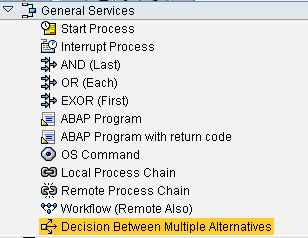
To Logically decide on the next step in the process chain flow( IF-THEN-ELSE), we can use option of "Decision between multiple Alternatives" Process type.
Step 1 : Choose "Decision between multiple Alternatives " Process type.Drag it to process chain window.
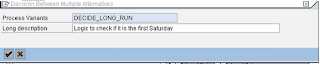
Step 2: We get a popu-up.Create a new decision making variant.

Step 3: Define the formula for IF. We have got formula editor for help.
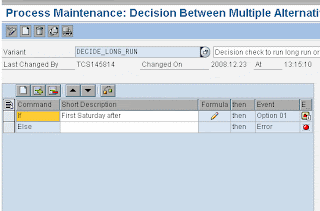
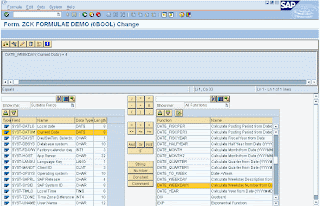
We can define as many formula's as we have we options for next step.
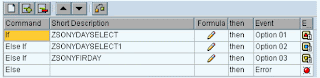
Step 4: Each of the above IF condition is marked against a event ( options ) and they can be used in the process chain to define the next step ( to the respective option )
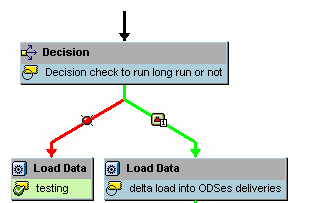
Step 1 : Choose "Decision between multiple Alternatives " Process type.Drag it to process chain window.

Step 2: We get a popu-up.Create a new decision making variant.


Step 3: Define the formula for IF. We have got formula editor for help.


We can define as many formula's as we have we options for next step.

Step 4: Each of the above IF condition is marked against a event ( options ) and they can be used in the process chain to define the next step ( to the respective option )

5 Nov 2008
DTP filer Routine
Following is the example of routine written in DTP filter.
While writing the logic of l_t_range-SIGN,l_t_range-OPTION,l_t_range-LOW etc. we should write l_t_range-Fieldname also here...
data: l_idx like sy-tabix.
read table l_t_range with key
fieldname = 'PLANT'.
l_idx = sy-tabix.
DATA : IT_PLANT LIKE TABLE OF /BI0/PPLANT.
data : it_plant_wa type /BI0/PPLANT.
DATA : IT_COUNTRY LIKE TABLE OF /BI0/PCOUNTRY.
CLEAR IT_COUNTRY.
CLEAR IT_PLANT.
SELECT * FROM /BI0/PCOUNTRY INTO TABLE IT_COUNTRY WHERE /BIC/ZMARKET2
= 'USA'.
IF IT_COUNTRY[] IS NOT INITIAL.
SELECT * FROM /BI0/PPLANT
INTO TABLE IT_PLANT
FOR ALL ENTRIES IN
IT_COUNTRY
WHERE COUNTRY = IT_COUNTRY-COUNTRY.
ENDIF.
LOOP AT IT_PLANT INTO IT_PLANT_WA.
l_t_range-low = IT_PLANT_WA-PLANT.
l_t_range-Fieldname = 'PLANT'.
l_t_range-SIGN = 'I'.
l_t_range-OPTION = 'EQ'.
append l_t_range.
ENDLOOP.
if l_idx <> 0.
modify l_t_range index l_idx.
else.
append l_t_range.
endif.
p_subrc = 0.
While writing the logic of l_t_range-SIGN,l_t_range-OPTION,l_t_range-LOW etc. we should write l_t_range-Fieldname also here...
data: l_idx like sy-tabix.
read table l_t_range with key
fieldname = 'PLANT'.
l_idx = sy-tabix.
DATA : IT_PLANT LIKE TABLE OF /BI0/PPLANT.
data : it_plant_wa type /BI0/PPLANT.
DATA : IT_COUNTRY LIKE TABLE OF /BI0/PCOUNTRY.
CLEAR IT_COUNTRY.
CLEAR IT_PLANT.
SELECT * FROM /BI0/PCOUNTRY INTO TABLE IT_COUNTRY WHERE /BIC/ZMARKET2
= 'USA'.
IF IT_COUNTRY[] IS NOT INITIAL.
SELECT * FROM /BI0/PPLANT
INTO TABLE IT_PLANT
FOR ALL ENTRIES IN
IT_COUNTRY
WHERE COUNTRY = IT_COUNTRY-COUNTRY.
ENDIF.
LOOP AT IT_PLANT INTO IT_PLANT_WA.
l_t_range-low = IT_PLANT_WA-PLANT.
l_t_range-Fieldname = 'PLANT'.
l_t_range-SIGN = 'I'.
l_t_range-OPTION = 'EQ'.
append l_t_range.
ENDLOOP.
if l_idx <> 0.
modify l_t_range index l_idx.
else.
append l_t_range.
endif.
p_subrc = 0.
7 Oct 2008
ABAP routine in infopackage for Multiple Selections
Requirement : 0plant should be restricted in the infopackage level using routine picking only selective plants ( say under some country or region )
Following is the code, i tried and working fine.
Solution
data: l_idx like sy-tabix.
DATA : IT_PLANT LIKE TABLE OF /BI0/PPLANT.
data : it_plant_wa type /BI0/PPLANT.
read table l_t_range with key
fieldname = 'PLANT'.
l_idx = sy-tabix.
SELECT * FROM /BI0/PPLANT INTO TABLE IT_PLANT WHERE COUNTRY = 'BE'.
LOOP AT IT_PLANT INTO IT_PLANT_WA.
l_t_range-low = IT_PLANT_WA-PLANT.
l_t_range-SIGN = 'I'.
l_t_range-OPTION = 'EQ'.
append l_t_range.
ENDLOOP.
modify l_t_range index l_idx.
p_subrc = 0.
Following is the code, i tried and working fine.
Solution
data: l_idx like sy-tabix.
DATA : IT_PLANT LIKE TABLE OF /BI0/PPLANT.
data : it_plant_wa type /BI0/PPLANT.
read table l_t_range with key
fieldname = 'PLANT'.
l_idx = sy-tabix.
SELECT * FROM /BI0/PPLANT INTO TABLE IT_PLANT WHERE COUNTRY = 'BE'.
LOOP AT IT_PLANT INTO IT_PLANT_WA.
l_t_range-low = IT_PLANT_WA-PLANT.
l_t_range-SIGN = 'I'.
l_t_range-OPTION = 'EQ'.
append l_t_range.
ENDLOOP.
modify l_t_range index l_idx.
p_subrc = 0.
17 Sept 2008
Dimension Size Vs Fact Size
The current size of all dimensions can be monitored in relation to fact table by t-code se38 running report SAP_INFOCUBE_DESIGNS.Also,we can test the infocube design by RSRV tests.It gives out the dimension to fact ratio.
The ratio of a dimension should be less than 10% of the fact table.
In the report,
Dimension table looks like /BI[C/O]/D[xxx]
Fact table looks like /BI[C/0]/[E/F][xxx]
Use T-CODE LISTSCHEMA to show the different tables associated with a cube.
When a dimension grows very large in relation to the fact table, db optimizer can't choose efficient path to the data because the guideline of each dimension having less than 10 percent of the fact table's records has been violated.
The condition of having large data growth in a dimension is called degenerative dimension.To fix, move the characteristics to different dimensions. But can only be done when no data in the InfoCube.
Note : In case if you have requirement to include item level details in the cube, then may be the Dim to Fact size will obviously be more which you cant help it.But you can make the item charecterstic to be in a line item dimension in that case.Line item dimension is a dimension having only one charecterstic in it.In this case, Since there is only one charecterstic in the dimension, the fact table entry can directly link with the SID of the charecterstic without using any DIMid (Dimid in dimension table usually connects the SID of the charecterstic with the fact) .
Since link happens by ignoring dimension table ( not in real sense ) , this will have faster query performance.
The ratio of a dimension should be less than 10% of the fact table.
In the report,
Dimension table looks like /BI[C/O]/D[xxx]
Fact table looks like /BI[C/0]/[E/F][xxx]
Use T-CODE LISTSCHEMA to show the different tables associated with a cube.
When a dimension grows very large in relation to the fact table, db optimizer can't choose efficient path to the data because the guideline of each dimension having less than 10 percent of the fact table's records has been violated.
The condition of having large data growth in a dimension is called degenerative dimension.To fix, move the characteristics to different dimensions. But can only be done when no data in the InfoCube.
Note : In case if you have requirement to include item level details in the cube, then may be the Dim to Fact size will obviously be more which you cant help it.But you can make the item charecterstic to be in a line item dimension in that case.Line item dimension is a dimension having only one charecterstic in it.In this case, Since there is only one charecterstic in the dimension, the fact table entry can directly link with the SID of the charecterstic without using any DIMid (Dimid in dimension table usually connects the SID of the charecterstic with the fact) .
Since link happens by ignoring dimension table ( not in real sense ) , this will have faster query performance.
BW Main tables
Extractor related tables:
ROOSOURCE - On source system R/3 server, filter by: OBJVERS = 'A'
Data source / DS type / delta type/ extract method (table or function module) / etc
RODELTAM - Delta type lookup table.
ROIDOCPRMS - Control parameters for data transfer from the source system, result of "SBIW - General setting - Maintain Control Parameters for Data Transfer" on OLTP system.
maxsize: Maximum size of a data packet in kilo bytes
STATFRQU: Frequency with which status Idocs are sent
MAXPROCS: Maximum number of parallel processes for data transfer
MAXLINES: Maximum Number of Lines in a DataPacket
MAXDPAKS: Maximum Number of Data Packages in a Delta Request
SLOGSYS: Source system
Query related tables:
RSZELTDIR: filter by: OBJVERS = 'A', DEFTP: REP - query, CKF - Calculated key figure
Reporting component elements, query, variable, structure, formula, etc
RSZELTTXT: Similar to RSZELTDIR. Texts of reporting component elements
To get a list of query elements built on that cube:
RSZELTXREF: filter by: OBJVERS = 'A', INFOCUBE= [cubename]
To get all queries of a cube:
RSRREPDIR: filter by: OBJVERS = 'A', INFOCUBE= [cubename]
To get query change status (version, last changed by, owner) of a cube:
RSZCOMPDIR: OBJVERS = 'A'
Workbooks related tables:
RSRWBINDEX List of binary large objects (Excel workbooks)
RSRWBINDEXT Titles of binary objects (Excel workbooks)
RSRWBSTORE Storage for binary large objects (Excel workbooks)
RSRWBTEMPLATE Assignment of Excel workbooks as personal templates
RSRWORKBOOK 'Where-used list' for reports in workbooks
Web templates tables:
RSZWOBJ Storage of the Web Objects
RSZWOBJTXT Texts for Templates/Items/Views
RSZWOBJXREF Structure of the BW Objects in a Template
RSZWTEMPLATE Header Table for BW HTML Templates
Data target loading/status tables:
rsreqdone, " Request-Data
rsseldone, " Selection for current Request
rsiccont, " Request posted to which InfoCube
rsdcube, " Directory of InfoCubes / InfoProvider
rsdcubet, " Texts for the InfoCubes
rsmonfact, " Fact table monitor
rsdodso, " Directory of all ODS Objects
rsdodsot, " Texts of ODS Objects
sscrfields. " Fields on selection screens
Tables holding charactoristics:
RSDCHABAS: fields
OBJVERS -> A = active; M=modified; D=delivered
(business content characteristics that have only D version and no A version means not activated yet)
TXTTABFL -> = x -> has text
ATTRIBFL -> = x -> has attribute
RODCHABAS: with fields TXTSHFL,TXTMDFL,TXTLGFL,ATTRIBFL
RSREQICODS. requests in ods
RSMONICTAB: all requests
Transfer Structures live in PSAPODSD
/BIC/B0000174000 Trannsfer Structure
Master Data lives in PSAPSTABD
/BIC/HXXXXXXX Hierarchy:XXXXXXXX
/BIC/IXXXXXXX SID Structure of hierarchies:
/BIC/JXXXXXXX Hierarchy intervals
/BIC/KXXXXXXX Conversion of hierarchy nodes - SID:
/BIC/PXXXXXXX Master data (time-independent):
/BIC/SXXXXXXX Master data IDs:
/BIC/TXXXXXXX Texts: Char.
/BIC/XXXXXXXX Attribute SID table:
Master Data views
/BIC/MXXXXXXX master data tables:
/BIC/RXXXXXXX View SIDs and values:
/BIC/ZXXXXXXX View hierarchy SIDs and nodes:
InfoCube Names in PSAPDIMD
/BIC/Dcube_name1 Dimension 1
......
/BIC/Dcube_nameA Dimension 10
/BIC/Dcube_nameB Dimension 11
/BIC/Dcube_nameC Dimension 12
/BIC/Dcube_nameD Dimension 13
/BIC/Dcube_nameP Data Packet
/BIC/Dcube_nameT Time
/BIC/Dcube_nameU Unit
PSAPFACTD
/BIC/Ecube_name Fact Table (inactive)
/BIC/Fcube_name Fact table (active)
ODS Table names (PSAPODSD)
BW3.5
/BIC/AXXXXXXX00 ODS object XXXXXXX : Actve records
/BIC/AXXXXXXX40 ODS object XXXXXXX : New records
/BIC/AXXXXXXX50 ODS object XXXXXXX : Change log
Previously:
/BIC/AXXXXXXX00 ODS object XXXXXXX : Actve records
/BIC/AXXXXXXX10 ODS object XXXXXXX : New records
T-code tables:
tstc -- table of transaction code, text and program name
tstct - t-code text
ROOSOURCE - On source system R/3 server, filter by: OBJVERS = 'A'
Data source / DS type / delta type/ extract method (table or function module) / etc
RODELTAM - Delta type lookup table.
ROIDOCPRMS - Control parameters for data transfer from the source system, result of "SBIW - General setting - Maintain Control Parameters for Data Transfer" on OLTP system.
maxsize: Maximum size of a data packet in kilo bytes
STATFRQU: Frequency with which status Idocs are sent
MAXPROCS: Maximum number of parallel processes for data transfer
MAXLINES: Maximum Number of Lines in a DataPacket
MAXDPAKS: Maximum Number of Data Packages in a Delta Request
SLOGSYS: Source system
Query related tables:
RSZELTDIR: filter by: OBJVERS = 'A', DEFTP: REP - query, CKF - Calculated key figure
Reporting component elements, query, variable, structure, formula, etc
RSZELTTXT: Similar to RSZELTDIR. Texts of reporting component elements
To get a list of query elements built on that cube:
RSZELTXREF: filter by: OBJVERS = 'A', INFOCUBE= [cubename]
To get all queries of a cube:
RSRREPDIR: filter by: OBJVERS = 'A', INFOCUBE= [cubename]
To get query change status (version, last changed by, owner) of a cube:
RSZCOMPDIR: OBJVERS = 'A'
Workbooks related tables:
RSRWBINDEX List of binary large objects (Excel workbooks)
RSRWBINDEXT Titles of binary objects (Excel workbooks)
RSRWBSTORE Storage for binary large objects (Excel workbooks)
RSRWBTEMPLATE Assignment of Excel workbooks as personal templates
RSRWORKBOOK 'Where-used list' for reports in workbooks
Web templates tables:
RSZWOBJ Storage of the Web Objects
RSZWOBJTXT Texts for Templates/Items/Views
RSZWOBJXREF Structure of the BW Objects in a Template
RSZWTEMPLATE Header Table for BW HTML Templates
Data target loading/status tables:
rsreqdone, " Request-Data
rsseldone, " Selection for current Request
rsiccont, " Request posted to which InfoCube
rsdcube, " Directory of InfoCubes / InfoProvider
rsdcubet, " Texts for the InfoCubes
rsmonfact, " Fact table monitor
rsdodso, " Directory of all ODS Objects
rsdodsot, " Texts of ODS Objects
sscrfields. " Fields on selection screens
Tables holding charactoristics:
RSDCHABAS: fields
OBJVERS -> A = active; M=modified; D=delivered
(business content characteristics that have only D version and no A version means not activated yet)
TXTTABFL -> = x -> has text
ATTRIBFL -> = x -> has attribute
RODCHABAS: with fields TXTSHFL,TXTMDFL,TXTLGFL,ATTRIBFL
RSREQICODS. requests in ods
RSMONICTAB: all requests
Transfer Structures live in PSAPODSD
/BIC/B0000174000 Trannsfer Structure
Master Data lives in PSAPSTABD
/BIC/HXXXXXXX Hierarchy:XXXXXXXX
/BIC/IXXXXXXX SID Structure of hierarchies:
/BIC/JXXXXXXX Hierarchy intervals
/BIC/KXXXXXXX Conversion of hierarchy nodes - SID:
/BIC/PXXXXXXX Master data (time-independent):
/BIC/SXXXXXXX Master data IDs:
/BIC/TXXXXXXX Texts: Char.
/BIC/XXXXXXXX Attribute SID table:
Master Data views
/BIC/MXXXXXXX master data tables:
/BIC/RXXXXXXX View SIDs and values:
/BIC/ZXXXXXXX View hierarchy SIDs and nodes:
InfoCube Names in PSAPDIMD
/BIC/Dcube_name1 Dimension 1
......
/BIC/Dcube_nameA Dimension 10
/BIC/Dcube_nameB Dimension 11
/BIC/Dcube_nameC Dimension 12
/BIC/Dcube_nameD Dimension 13
/BIC/Dcube_nameP Data Packet
/BIC/Dcube_nameT Time
/BIC/Dcube_nameU Unit
PSAPFACTD
/BIC/Ecube_name Fact Table (inactive)
/BIC/Fcube_name Fact table (active)
ODS Table names (PSAPODSD)
BW3.5
/BIC/AXXXXXXX00 ODS object XXXXXXX : Actve records
/BIC/AXXXXXXX40 ODS object XXXXXXX : New records
/BIC/AXXXXXXX50 ODS object XXXXXXX : Change log
Previously:
/BIC/AXXXXXXX00 ODS object XXXXXXX : Actve records
/BIC/AXXXXXXX10 ODS object XXXXXXX : New records
T-code tables:
tstc -- table of transaction code, text and program name
tstct - t-code text
10 Sept 2008
BW tables
Custome Infoobjects Tabels:
/BIC/M -- View of Master data Tables
/BIC/P -- Master data Table, Time Independent attributes
/BIC/Q -- Master data Table, Time Dependent attributes
/BIC/X -- SID Table, Time Independent
/BIC/Y -- SID Tabel, Time Dependent
/BIC/T -- Text Table
/BIC/H -- Heirarchy Table
/BIC/K -- Heirarchy SID Table
Standard Infoobjects Tabels(Buss. Content):
Replace "C" with "0" in above tables.
Ex: /BI0/M -- View of Master data Tables
Standard InfoCUBE Tables :
/BI0/F -- Fact Table(Before Compression)
/BI0/E -- Fact Table(After Compression)
/BI0/P -- Dimension Table - Data Package
/BI0/T -- Dimension Table - Time
/BI0/U -- Dimension Table - Unit
/BI0/1, 2, 3, .......A,B,C,D : -- Dimension Tables
BW Tables:
BTCEVTJOB -- To check List of jobs waiting for events
ROOSOURCE -- Control parameters for Datasource
ROOSFIELD -- Control parameters for Datasource
ROOSPRMSC -- Control parameters for Datasource
ROOSPRMSF -- Control parameters for Datasource
-- More info @ ROOSOURCE weblog
RSOLTPSOURCE -- Replicate Table for OLTP source in BW
RSDMDELTA -- Datamart Delta Management
RSSDLINITSEL, RSSDLINITDEL
-- Last valid Initialization to an OLTP Source
RSUPDINFO -- Infocube to Infosource correlation
RSUPDDAT -- Update rules key figures
RSUPDENQ -- Removal of locks in the update rules
RSUPDFORM -- BW: Update Rules - Formulas - Checking Table
RSUPDINFO -- Update info (status and program)
RSUPDKEY -- Update rule: Key per key figure
RSUPDROUT -- Update rules - ABAP routine - check table
RSUPDSIMULD -- Table for saving simulation data update
RSUPDSIMULH -- Table for saving simulation data header information
RSDCUBEIOBJ -- Infoobjects per Infocube
RSIS -- Infosouce Info
RSUPDINFO -- Update Rules Info
RSTS -- Transfer Rules Info
RSKSFIELD -- Communication Structure fields
RSALLOWEDCHAR -- Special Characters Table(T Code : RSKC, To maintain)
RSDLPSEL -- Selection Table for fields scheduler(Infpak's)
RSDLPIO -- Log data packet no
RSMONICTAB -- Monitor, Data Targets(Infocube/ODS) Table, request related info
RSTSODS -- Operational data store for Transfer structure
RSZELTDIR -- Query Elements
RSZGLOBV -- BEx Variables
RXSELTXREF, RSCOMPDIR -- Reports/query relavent tables
RSCUSTV -- Query settings
RSDIOBJ -- Infoobjects
RSLDPSEL -- Selection table for fields scheduler(Info pak list)
RSMONIPTAB -- InfoPackage for the monitor
RSRWORKBOOK -- Workbooks & related query genunid's
RSRREPDIR -- Contains Genuin id, Rep Name, author, etc...
RSRINDEXT -- Workbook ID & Name
RSREQDONE -- Monitor: Saving of the QM entries
RSSELDONE -- Monitor : Selection for exected requests
RSLDTDONE -- Texts on the requeasted infopacks & groups
RSUICDONE -- BIW: Selection table for user-selection update Infocubes's
RSSDBATCH -- Table for Batch run scheduler
RSLDPDEL -- Selection table for deleting with full update scheduler
RSADMINSV -- RS Administration
RSSDLINIT -- Last Valid Initializations to an OLTP Source
BTCEVTJOB --To check event status(scheduled or not)
VARI -- ABAP Variant related Table
VARIDESC -- Selection Variants: Description
SMQ1 -- QRFC Monitor(Out Bound)
SM13 -- Update Records status
/BIC/M -- View of Master data Tables
/BIC/P -- Master data Table, Time Independent attributes
/BIC/Q -- Master data Table, Time Dependent attributes
/BIC/X -- SID Table, Time Independent
/BIC/Y -- SID Tabel, Time Dependent
/BIC/T -- Text Table
/BIC/H -- Heirarchy Table
/BIC/K -- Heirarchy SID Table
Standard Infoobjects Tabels(Buss. Content):
Replace "C" with "0" in above tables.
Ex: /BI0/M -- View of Master data Tables
Standard InfoCUBE Tables :
/BI0/F -- Fact Table(Before Compression)
/BI0/E -- Fact Table(After Compression)
/BI0/P -- Dimension Table - Data Package
/BI0/T -- Dimension Table - Time
/BI0/U -- Dimension Table - Unit
/BI0/1, 2, 3, .......A,B,C,D : -- Dimension Tables
BW Tables:
BTCEVTJOB -- To check List of jobs waiting for events
ROOSOURCE -- Control parameters for Datasource
ROOSFIELD -- Control parameters for Datasource
ROOSPRMSC -- Control parameters for Datasource
ROOSPRMSF -- Control parameters for Datasource
-- More info @ ROOSOURCE weblog
RSOLTPSOURCE -- Replicate Table for OLTP source in BW
RSDMDELTA -- Datamart Delta Management
RSSDLINITSEL, RSSDLINITDEL
-- Last valid Initialization to an OLTP Source
RSUPDINFO -- Infocube to Infosource correlation
RSUPDDAT -- Update rules key figures
RSUPDENQ -- Removal of locks in the update rules
RSUPDFORM -- BW: Update Rules - Formulas - Checking Table
RSUPDINFO -- Update info (status and program)
RSUPDKEY -- Update rule: Key per key figure
RSUPDROUT -- Update rules - ABAP routine - check table
RSUPDSIMULD -- Table for saving simulation data update
RSUPDSIMULH -- Table for saving simulation data header information
RSDCUBEIOBJ -- Infoobjects per Infocube
RSIS -- Infosouce Info
RSUPDINFO -- Update Rules Info
RSTS -- Transfer Rules Info
RSKSFIELD -- Communication Structure fields
RSALLOWEDCHAR -- Special Characters Table(T Code : RSKC, To maintain)
RSDLPSEL -- Selection Table for fields scheduler(Infpak's)
RSDLPIO -- Log data packet no
RSMONICTAB -- Monitor, Data Targets(Infocube/ODS) Table, request related info
RSTSODS -- Operational data store for Transfer structure
RSZELTDIR -- Query Elements
RSZGLOBV -- BEx Variables
RXSELTXREF, RSCOMPDIR -- Reports/query relavent tables
RSCUSTV -- Query settings
RSDIOBJ -- Infoobjects
RSLDPSEL -- Selection table for fields scheduler(Info pak list)
RSMONIPTAB -- InfoPackage for the monitor
RSRWORKBOOK -- Workbooks & related query genunid's
RSRREPDIR -- Contains Genuin id, Rep Name, author, etc...
RSRINDEXT -- Workbook ID & Name
RSREQDONE -- Monitor: Saving of the QM entries
RSSELDONE -- Monitor : Selection for exected requests
RSLDTDONE -- Texts on the requeasted infopacks & groups
RSUICDONE -- BIW: Selection table for user-selection update Infocubes's
RSSDBATCH -- Table for Batch run scheduler
RSLDPDEL -- Selection table for deleting with full update scheduler
RSADMINSV -- RS Administration
RSSDLINIT -- Last Valid Initializations to an OLTP Source
BTCEVTJOB --To check event status(scheduled or not)
VARI -- ABAP Variant related Table
VARIDESC -- Selection Variants: Description
SMQ1 -- QRFC Monitor(Out Bound)
SM13 -- Update Records status
3 Sept 2008
How to define F4 Order Help for infoobject for reporting
Open attributes tab of infoobject definition.
In that you will observe column for F4 order help against each attribute of that infoobject like below :

This field defines whether and where the attribute should appear in the value help.
Valid values:
• 00: The attribute does not appear in the value help.
• 01: The attribute appears at the first position (to the left) in the value help.
• 02: The attribute appears at the second position in the value
help.
• 03: ......
• Altogether, only 40 fields are permitted in the input help. In addition to the attributes, the characteristic itsel, its texts, and the compounded characteristics are also generated in the input help. The total number of these fields cannot exceed 40.
So accordingly , the inofobjects are changed> Suppose if say for infobject 0vendor, if in case 0country ( which is an attribute of 0vendor) is not be shown in the F4 help of 0vendor , then mark 0 against the attribtue 0country in the infoobject definition of 0vendor.
In that you will observe column for F4 order help against each attribute of that infoobject like below :

This field defines whether and where the attribute should appear in the value help.
Valid values:
• 00: The attribute does not appear in the value help.
• 01: The attribute appears at the first position (to the left) in the value help.
• 02: The attribute appears at the second position in the value
help.
• 03: ......
• Altogether, only 40 fields are permitted in the input help. In addition to the attributes, the characteristic itsel, its texts, and the compounded characteristics are also generated in the input help. The total number of these fields cannot exceed 40.
So accordingly , the inofobjects are changed> Suppose if say for infobject 0vendor, if in case 0country ( which is an attribute of 0vendor) is not be shown in the F4 help of 0vendor , then mark 0 against the attribtue 0country in the infoobject definition of 0vendor.
TCURF, TCURR and TCURX
TCURF is always used in reference to Exchange rate.( in case of currency translation ).For example, Say we want to convert fig's from FROM curr to TO curr at Daily avg rate (M) and we have an exchange rate as 2,642.34. Factors for this currency combination for M in TCURF are say 100,000:1.Now the effective exchange rate becomes 0.02642.
Question ( taken from sdn ):
can't we have an exchange rate of 0.02642 and not at all use the factors from TCURF table?.I suppose we have to still maintain factors as 1:1 in TCURF table if we are using exchange rate as 0.02642. am I right?. But why is this so?. Can't I get rid off TCURF.
What is the use of TCURF co-existing with TCURR.
Answer :
Normally it's used to allow you a greater precision in calaculations
ie 0.00011 with no factors gives a different result to
0.00111 with factor of 10:1
So basing on the above answer, TCURF allows greater precision in calculations.
Its factor shud be considered before considering exchange rate.
-------------------------------------------------------------------------------------
TCURR
TCURR table is generally used while we create currency conversion types.
The currency conversion types will refer to the entries in TCURR defined against each currency ( with time reference) and get the exchange rate factor from source currency to target currency.
-------------------------------------------------------------------------------------
TCURX
TCURX table is used to exactly define the correct number of decimal places for any currency. It shows effect in the BEx report output.
-------------------------------------------------------------------------------------
Question ( taken from sdn ):
can't we have an exchange rate of 0.02642 and not at all use the factors from TCURF table?.I suppose we have to still maintain factors as 1:1 in TCURF table if we are using exchange rate as 0.02642. am I right?. But why is this so?. Can't I get rid off TCURF.
What is the use of TCURF co-existing with TCURR.
Answer :
Normally it's used to allow you a greater precision in calaculations
ie 0.00011 with no factors gives a different result to
0.00111 with factor of 10:1
So basing on the above answer, TCURF allows greater precision in calculations.
Its factor shud be considered before considering exchange rate.
-------------------------------------------------------------------------------------
TCURR
TCURR table is generally used while we create currency conversion types.
The currency conversion types will refer to the entries in TCURR defined against each currency ( with time reference) and get the exchange rate factor from source currency to target currency.
-------------------------------------------------------------------------------------
TCURX
TCURX table is used to exactly define the correct number of decimal places for any currency. It shows effect in the BEx report output.
-------------------------------------------------------------------------------------
Subscribe to:
Posts (Atom)